
Plan trips abroad with friends, all in one free app
Nuvigate puts planning, maps, a guide and translation help in one place. It runs in your phone’s browser, with nothing to install.
Tokyo · Seoul · Taipei · Hong Kong · Bangkok · Shanghai · Beijing · Vietnam · Singapore · Kuala Lumpur
What it does
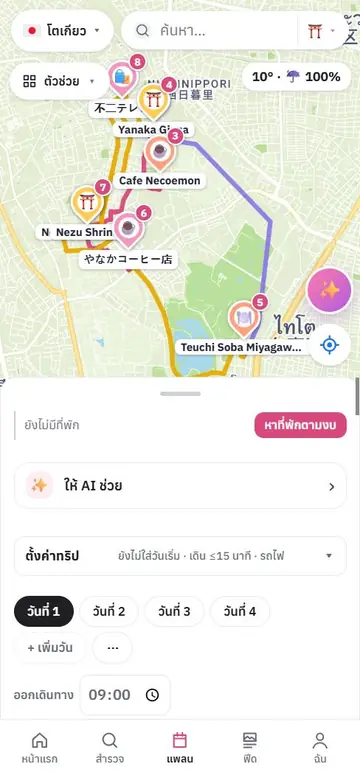
Day-by-day plans on a map
Add places to each day; the app times the day and shows how to get between stops
AI planning that builds on your plan
Say how many days and what you like, or let the AI add nearby places to what you have
Plan together with friends
Send an invite link; everyone edits one plan, with a chat for the trip
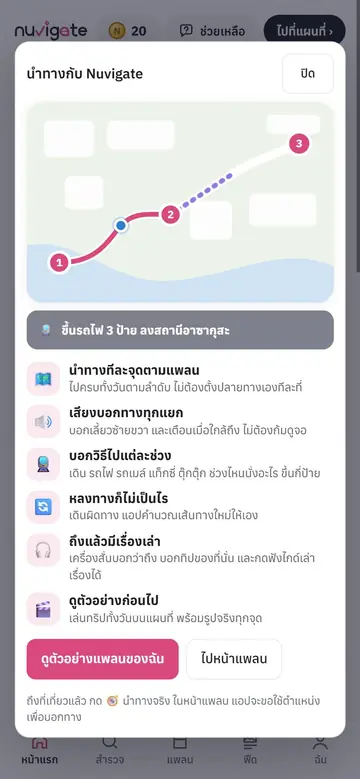
Audio guide
Hear the story and tips for each place in your language
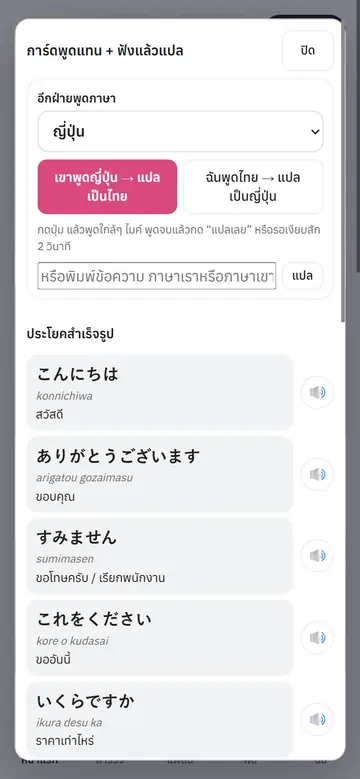
Listen-and-translate and phrase cards
Speak and get a translation, or show a phrase card to locals
Hotels within your budget
Set a nightly budget and find places to stay near your plan
Currency converter
See what 430 yen is in your money straight away
Visa check, trains and SOS
Before-you-go info, offline train times in some cities and emergency numbers
How to start
- Open nuvigateapp.com and pick your city
- Start from a ready-made plan, let the AI plan, or tap the map yourself
- Invite friends with a link, then use the guide and translation on the trip
Ready-made plans
FAQ
Is Nuvigate free?
Yes. Sign-up is free. Some features, such as the AI and Google search, have a daily limit.
Do I need to download an app?
No. Open nuvigateapp.com in your browser, and add it to your home screen to use it like an app.
Which cities does it cover?
Tokyo, Seoul, Taipei, Hong Kong, Bangkok, Shanghai, Beijing, Vietnam, Singapore, Kuala Lumpur
How do I plan with friends?
In the Plan tab, tap invite and send the link. Friends sign up free, join the same trip, edit the plan and chat.
Which languages are supported?
The app is in Thai, English, Chinese, Korean, Japanese, Russian, Malay, Indonesian and Hindi.
Are there sample plans?
Yes: ready-made 3-day plans for Tokyo, Seoul, Taipei, Hong Kong and Bangkok that you can copy and edit.